

Understand the role of cPanel
cPanel is a management interface used in web hosting. It gives access to the main technical tools of a hosting account without requiring command-line work.
Depending on the hosting plan, it may help manage files, email accounts, Webmail, databases, domains, SSL, FTP and installation tools.
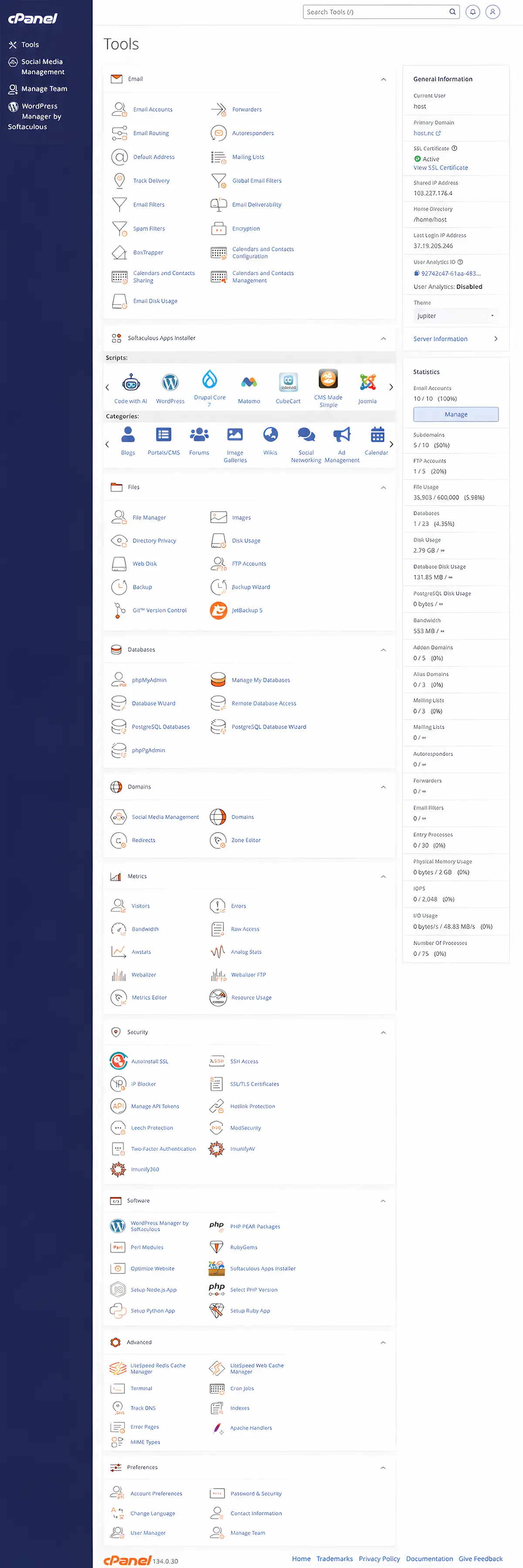
1. Difference between the client area and cPanel
The HOST.NC client area is used for orders, invoices, services, payments, support and requests. cPanel is used for the technical side of the hosting account.
A simple way to remember it: the client area manages the service relationship; cPanel manages website, email and hosting tools.
2. Email and Webmail
cPanel can be used to create and manage email accounts associated with a domain, depending on the plan.
It may also provide access to Webmail so email can be checked from a browser.
3. Website files
Website files are usually stored in the hosting account. cPanel can provide tools to upload, edit or organize those files.
For simple websites, this can be enough. For WordPress, files are usually managed by the application and updates.
4. Databases
Many dynamic websites, including WordPress, use a database. cPanel can provide tools to create and manage databases.
A database should not be modified randomly, because it may contain website content and settings.
5. Domains and subdomains
cPanel may help connect domains, subdomains or aliases to the hosting account.
DNS settings and domain configuration should remain coherent to avoid broken websites or email.
6. SSL and HTTPS
cPanel often includes tools related to SSL certificates and HTTPS configuration.
The domain must point correctly to the hosting account for SSL to work properly.
7. WordPress and installation tools
Some hosting environments include tools such as Softaculous to simplify WordPress installation.
Even with a simplified installer, choose a good domain, enable HTTPS and keep the site updated.
8. FTP and backups
FTP access may be used to transfer files. Backups are also important before major changes.
Do not rely only on memory or manual copies: make backup habits part of the project.
Common mistakes to avoid
Do not confuse cPanel with the customer billing area. Also avoid deleting files, mailboxes or databases without understanding their role.
When in doubt, ask support before making irreversible changes.
FAQ
Is cPanel the same as the HOST.NC client area?
No. The client area manages services and support. cPanel manages technical hosting tools.
Can cPanel manage professional email?
Depending on the plan, cPanel can help manage email accounts and Webmail.
Do I need to be technical to use cPanel?
Basic tasks are accessible, but some settings should be handled carefully.
Need help with your project?
HOST.NC can help you understand the right domain, hosting, email and web setup for your needs.